|
|
 |
|
|
|
register |
bbs |
search |
rss |
faq |
about
|
|
|
meet up |
add to del.icio.us |
digg it
|
|
|
| Technophiliacs & Technophiles The Technophiliacs forum is for discussing any and all forms of tech and other types of social backwardness. Including discussions of strange home-brewed hardware technology. Where to get good tools. How to make fiberglass molds. Computer hardware and software technolgy, including operating systems, applications, networking, hardware, CPU's, disk drives, and other geeky things. Viruses and Artificial Life discussions. End user tools discussions and support issues. Gating the Internet with other nets. |
 |
|
# 1


2008-12-11, 19:48
|
|
Regular
|
|
Back of the food stamp line

|
|
 Getting rid of the Start Bar
Now that I have Rocket Dock I want to make the Start Bar just go away completely. I've put a link on my dock to the start menu, so it's literally useless now, it just gets in the way of my pretty desktop.
Right now I have it as small as it can go, but no matter what I do there's still that blue line at the bottom of my screen. It drives me fucking nuts.
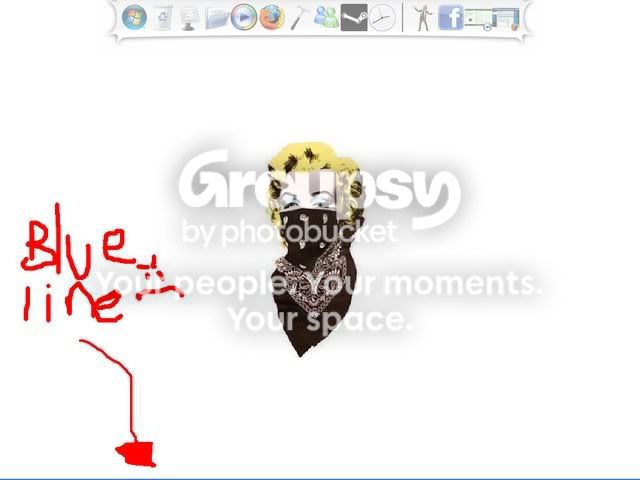
So how can I just make it disappear? Auto-hide doesn't cut it, and that blue line needs to go. |
# 2
2008-12-11, 21:36
|
|
|
 Re: Getting rid of the Start Bar
change the color of it to match your background
[edit] wait...is this XP or vista? I don't have any experience with vista...
Last edited by TimCo; 2008-12-11 at 21:37.
Reason: XP or Vista?
|
# 3
2008-12-11, 21:40
|
|
|
 Re: Getting rid of the Start Bar
So hitting F11 is too manual for you?
|
# 4
2008-12-12, 00:01
|
|
Regular
|
|
Back of the food stamp line
|
|
Re: Getting rid of the Start Bar
Quote:
Originally Posted by TimCo

change the color of it to match your background
[edit] wait...is this XP or vista? I don't have any experience with vista...
|
Doesn't work if I have a multicolored background, which I usually do. I thought there'd be some easy way to get rid of it, like some check box I should be clicking or something.
And XP, sorry, shoulda specified.
|
# 5
2008-12-12, 00:02
|
|
Regular
|
|
Back of the food stamp line
|
|
Re: Getting rid of the Start Bar
Quote:
Originally Posted by moonmeister
So hitting F11 is too manual for you?
|
I don't care about when I have a window open, I care about what my desktop looks like, F11 doesn't work for that.
That damn blue line is making me rage.
|
# 6
2008-12-12, 00:08
|
|
Regular
|
|
Straight out of Compton!
|
|
Re: Getting rid of the Start Bar
Quote:
Originally Posted by xxombie
I don't care about when I have a window open, I care about what my desktop looks like, F11 doesn't work for that.
That damn blue line is making me rage.
|
Hit the menu button on your monitor, stretch your screen slightly vertically, then move it down enough to hide the bar.
|
# 7
2008-12-12, 00:11
|
|
Regular
|
|
Ontario Canada

|
|
Re: Getting rid of the Start Bar
I haven't used Windows in years, but can't you just close explorer.exe ? Could someone verify this or shoot it down before she tries it?
|
# 8
2008-12-12, 00:20
|
|
Regular
|
|
Back of the food stamp line
|
|
Re: Getting rid of the Start Bar
Quote:
Originally Posted by Hit-The-Bong
Hit the menu button on your monitor, stretch your screen slightly vertically, then move it down enough to hide the bar.
|
Ack, I thought this would work, but it doesn't. My mouse wont go beyond the screen, no matter where it is.
|
# 9
2008-12-12, 00:21
|
|
Regular
|
|
Back of the food stamp line
|
|
Re: Getting rid of the Start Bar
Quote:
Originally Posted by Cegstar
I haven't used Windows in years, but can't you just close explorer.exe ? Could someone verify this or shoot it down before she tries it?
|
This sounds promising, but I don't wanna do it till someone else does haha.
|
# 10
2008-12-12, 00:22
|
|
Regular
|
|
Ontario Canada
|
|
Re: Getting rid of the Start Bar
Quote:
Originally Posted by xxombie
This sounds promising, but I don't wanna do it till someone else does haha.
|
I'd be more than willing to test it... but... no windows computer here.
|
|
#11
2008-12-12, 01:02 |
|
|
Re: Getting rid of the Start Bar
This sounds promising, but I don't wanna do it till someone else does haha.
Shutting down explorer doesn't hurt the computer... it just gets rid of your desktop.
I can still run the computer 100% without explorer running just using the task manager (infact, thats how one of my gaming rigs worked 24/7).
You'll probably need SOME kind of shell running to use your dock.
You could get something like litestep and just config it down to nothing.
|
|
#12
2008-12-12, 01:32 |
|
|
Re: Getting rid of the Start Bar
MAke it transparent Do?
http://www.snapfiles.com/get/transbar.html
|
|
#13
2008-12-12, 03:54 |
|
Regular
|
|
Back of the food stamp line
|
|
Re: Getting rid of the Start Bar
Quote:
|
Originally Posted by SWATFAG
MAke it transparent Do?
http://www.snapfiles.com/get/transbar.html
|
Yeyyyyy thank you, works like a charm.
I didn't know it'd be so hard to just get rid of your Start Bar, damn Windows is stubborn. |
|
#14
2008-12-13, 00:50 |
chasm69 
Regular
|
|
|
|
Re: Getting rid of the Start Bar
Bringing the Task Manager up and closing explore.exe works
Just done it my self
|
|
#15
2008-12-13, 02:23 |
|
Regular
|
|
Anacortes, Washington, US
|
|
Re: Getting rid of the Start Bar
There's a dock like this the CAD room at my school uses, there's an option in the settings to use it instead of the start bar. Gets rid of start bar completely, unless you un-check the box.
Though the start menu still comes up if the windows key is pressed.
|
|
#16
2008-12-14, 00:37 |
|
|
Re: Getting rid of the Start Bar
OP, although transbar is good but i think if you really want to get rid of startmenu switching shell to another File Manager might be good for you.
but comeon, i have start menu on auto hide and the only reason i keep it there is to keep a check on running processes and network connections.
|
|
#17
2008-12-21, 04:13 |
|
|
Re: Getting rid of the Start Bar
http://www.totse.com/community/showthread.php?t=2157570 This thread might be of some help.
|
|
#18
2008-12-21, 22:54 |
|
|
Re: Getting rid of the Start Bar
Uhh, doesn't RocketDock have a hide feature for the start bar? I know ObjectDock does and they are basically the same thing.
If not, switch to ObjectDock.
|
|
#19
2008-12-22, 03:04 |
|
Regular
|
|
Staten Island New York (Ugh)
|
|
Re: Getting rid of the Start Bar
Quote:
|
Originally Posted by cronic5
Uhh, doesn't RocketDock have a hide feature for the start bar? I know ObjectDock does and they are basically the same thing.
If not, switch to ObjectDock.
|
Objectdock costs money if youre not 1337. |
|
#20
2008-12-29, 01:24 |
|
|
Re: Getting rid of the Start Bar
Objectdock costs money if youre not 1337.
Umm, no it doesn't? Only the "pro" version does, which adds shitty features anyway.
|
|
#21
2008-12-29, 17:10 |
zuperxtreme
Regular
|
|
|
|
Re: Getting rid of the Start Bar
You can try this: http://www.softplatz.com/Soft/Security-Privacy/Other/OneClick-Quick-Hide-Window.html
|
| Thread Tools |
 Show Printable Version  Email this Page
|
| Display Modes |
 Linear Mode Linear Mode Switch to Hybrid Mode  Switch to Threaded Mode
|
 Posting Rules
|
You may not post new threads
You may not post replies
You may not post attachments
You may not edit your posts
HTML code is Off
|
|
|
|
|
|
To the best of our knowledge, the text on this page may be freely reproduced and distributed.

totse.com certificate signatures
|
|
|
About | Community | Bad Ideas | Drugs | Ego | Erotica | Fringe | Society | Technology
|
|
|
|
|
|
![]()
![]()
|


 Getting rid of the Start Bar

