Ugh, alright. This should work. Since you already have windows installed on the slave drive you may have issues depending on how different this computer is to the old one you ripped the hdd from.
If you've already played around with the master drive. Set it back up as it was and leave it.
Leave your original hdd alone. This will be set as master already and will need to stay as master. On the second hdd you will have all those pins that you were talking about. There's the little plastic jumper as well. ie this stuff:
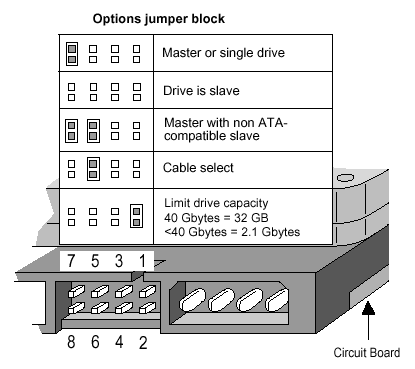
Now don't copy that info as your hdd will probably be different. On it somewhere should be a sticker (might be something else) with similar information on it. Find the config for slave and set the jumper accordingly. ie: on the picture, you just remove the jumper ( I believe this is common). Now you can plug the slave ide (next plug down the line that your current hdd is plugged into) into the back of this hdd.
Now boot into bios and make sure both hdd's are recognised. If you boot allow the computer to boot it should still boot into the windows you have installed on your master.
You now have the option of installing a bootloader such as 'lilo' or if you have an xp disc you can try the fix mbr command
Done!
*sorry for using hdd so much




 Putting 2 HDs in a computer



 Putting 2 HDs in a computer


 ff. and it's a maxtor drive, does this mean anything?
 Show Printable Version
 Email this Page
 Linear Mode
 Switch to Hybrid Mode
 Switch to Threaded Mode
